
Account system
BDO Character Tag & Item Copy: Set Up an Alt Without Wasting Fuel
Tagging links your main and alt's location workflow; Item Copy is the separate step that puts eligible linked gear on the tagged character. Clear every red restriction before spending Marni's Unstable Fuel.

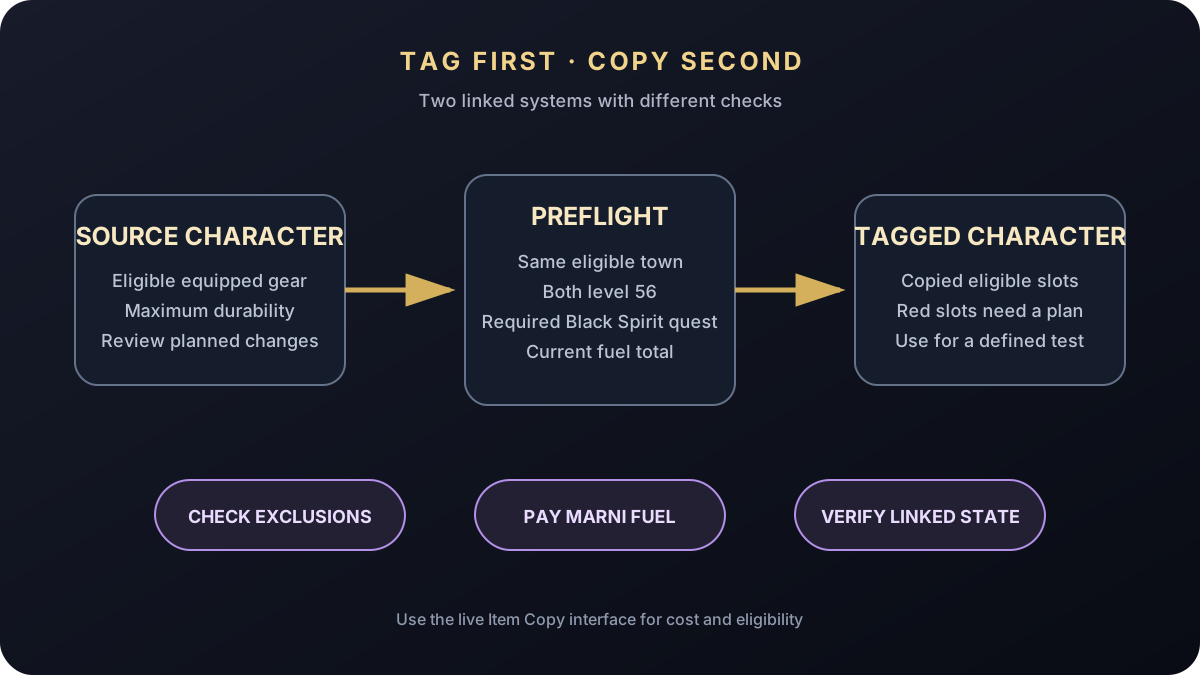
Tagging vs. Item Copy [1]
Character Tag links your main and alt for the shared location and swap workflow. Item Copy is the separate step that creates linked copies of eligible equipped gear for the tagged character.
You can be allowed to tag while still failing an Item Copy requirement, so troubleshoot them separately. Use both when an alt needs real time in the same content without buying another full eligible set.
Clear every requirement first [1]
For Item Copy, both characters must be level 56, have non-negative Karma, and complete Black Spirit's Gift (Marni's Suspicious Device). Tagging and untagging also require both characters together in an eligible town and meeting the current interface conditions.
If the button is unavailable, check both characters. Copy the exact red restriction text—it usually points to location, level, Karma, quest state, inventory, or another blocked condition.
Check the fuel bill before you click [1]
Item Copy uses Marni's Unstable Fuel from Old Moon Managers. Do not trust an old fuel number; use the total calculated for the eligible gear on your screen.
Review the main's equipped items before paying. Copying gear you immediately replace burns fuel for no reason. For a class test, set the budget and checkpoint first, then decide whether a full copy is worth it.
Fix every red gear slot [1]
Not every item can be copied. The official guide lists exclusions that include ungraduated Tuvala or Naru gear, rented gear, quest gear, certain life-skill equipment such as fishing rods, floats, and hunting matchlocks, and Jetina gear that has not reached PEN. Restrictions can change, so the current Item Copy interface is the final authority for a specific item. Do not assume that one successful armor slot means weapons, accessories, life-skill equipment, or special progression items are all eligible. Resolve each excluded slot before judging whether the copied character is ready for the intended content.
Know what stays linked [1]
Repair the original gear to maximum durability before copying. Copied items stay linked to the originals, and changes to the main set can flow to the copied version under the system rules.
Big warning: Lightstones placed into copied Artifacts are lost when the characters are untagged. Before enhancing, reforming, selling, adding Lightstones, or untagging, check the copied state and read the exact warning in game.
Run this before you spend fuel. It catches most failed copies and expensive misunderstandings.
- Put both intended characters in the same eligible town and check current tag conditions.
- Confirm both characters are level 56, have non-negative Karma, and the required Black Spirit quest is complete.
- Repair the original equipped gear to maximum durability.
- Review every excluded or red slot and decide how the alternate character will fill it.
- Remove or deliberately account for Lightstones in copied Artifacts before untagging.
- Read the current Marni's Unstable Fuel total in game before buying fuel.
- Set a test checkpoint so the tag has a purpose beyond copying gear.
What to do next
Sources & patch checks
These official sources back the system facts and patch scope. BDOForge's explanation is original; the live game and linked official pages still win if something changes.
- [1] Official Black Desert Character Tag guidePrimary requirements and restrictions reference
- [2] Official NA/EU live patch reviewed for conflictsCurrentness check
Keep going

Account QoL
The Magnus: Fast Travel, Remote Storage, and Rewards That Matter
A detailed Black Desert guide to Abyss One: The Magnus, including Abyssal Vein travel, linked regional storage, key rewards, and troubleshooting checks.
Account QoL
BDO Crystal Presets: Swap Safely, Extract Intact, and Handle Breaks
A current Black Desert crystal-system guide covering Crystal Inventory, Transfusion presets, extraction versus deletion, breakage, restoration, and locked slots.